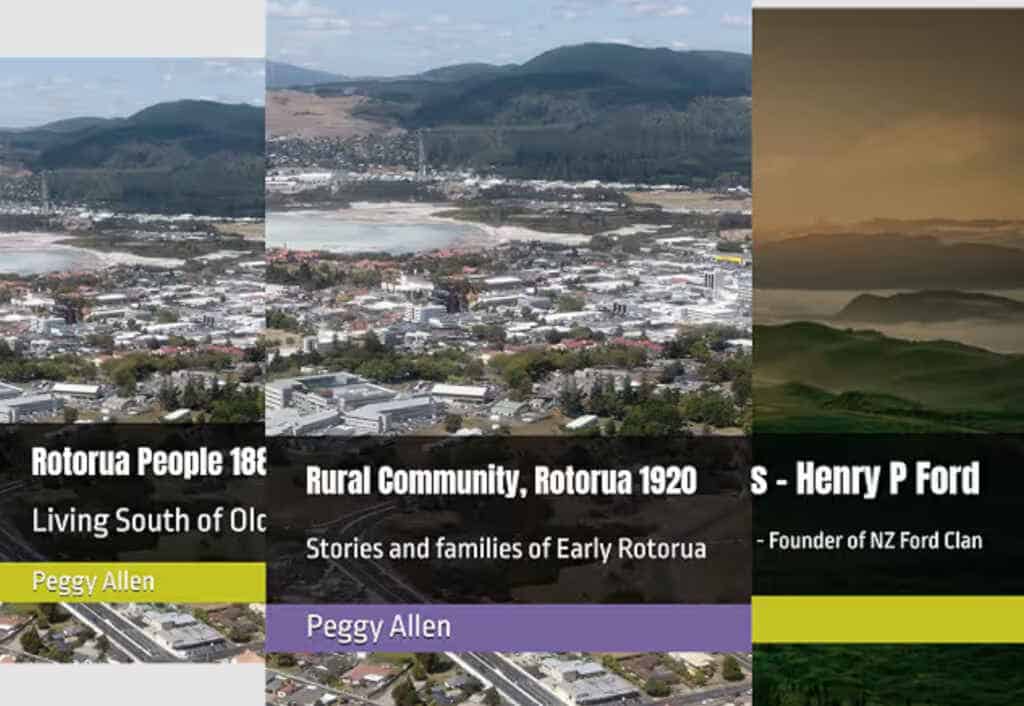
Peggy Allen was a Rotorua schoolteacher who spent decades writing down what everyone else assumed would never be forgotten. In 1982 she typed a family scrapbook on a machine she cheerfully admitted she was still learning to use (“It is obvious that I am only learning to type”), added photographs, ran off twenty-odd copies and posted them to relatives. Her husband Gerry wrote stories, poems and cartoons, and left them as typescripts.
In 2026, seven of those booklets became Amazon paperbacks. The words are still theirs. What changed is how long it took to get from a box of faded pages to a printed book: months rather than years, with an AI doing the typing and layout and people making every judgement call.
This post sets out the whole process, step by step, in case you have a box of your own. It also outlines the skills I did not need this time, which could take a book from draft to polished. I have written the conversion up as a reusable skill file, and I am happy to share it.
The seven books at a glance
| # | Title | Kind | Pages |
|---|---|---|---|
| 1 | Rural Community 1920s | Community history | 139 |
| 2 | Rotorua People 1880s to 1940s | Community history | 287 |
| 3 | NZ Pioneers: A Ford Family History | Family history | 259 |
| 4 | The Fulljames Family | Family history | 184 |
| 5 | The Allen Family | Family history | 112 |
| 6 | The Lewin Family | Family history | 113 |
| 7 | Watery Moonlight: Yarns from the Long White Cloud | Stories, poems and cartoons | 200 |
All seven make up the Rotorua Roots Series: seven books, four families, one town. Books 1 to 6 are Peggy’s community and family histories; Book 7 is Gerry Allen’s own collection, in a different voice. The whole series is on Amazon: https://www.amazon.com.au/dp/B0HHGPXHNJ. The descriptions come later in this post.
Step 1. Scan the documents
Everything starts with a good scan, and nothing downstream can fix a bad one.
- The equipment I used. A Brother MFC-J6540DW, an A3 scanner with a document feeder, driven by VueScan 9 x64 at 300 dpi. The feeder handled most pages quickly. Older original typing and fragile pages would not feed through, so those were scanned one at a time on the platen.
- Resolution. 300 dpi is the floor for text pages. Scan photographs and printed halftones at 400 to 600 dpi so they survive being reproduced.
- One file per page, or per spread. The Fulljames scrapbook was scanned as spreads, with a left and a right page in each image. The transcript then labels them 0002L and 0002R.
- Name files from the start.
Fulljames_0007.jpgis boring and perfect. A folder per book keeps seven projects from bleeding into each other. - Do not straighten sideways pages. Some of Peggy’s pages were landscape and scanned on their side. Leave them as they are and rotate in software later. The rotated copy gets a suffix such as
_rot. - Scan everything, including the awkward bits. Loose letters tucked into the back, the inside covers, the pasted-in newspaper clippings, the page that has nothing on it. A blank page in the original is a decision you want to make deliberately.
- Keep the originals. The scans are the source of truth. Nothing in the later steps should overwrite them.
Step 2. Upload the scans for Claude to read
The scans go into a cloud folder, in this case Google Drive, which Claude reads directly. I keep the series-level material (the tracker, the series page, the back covers and a folder of extra image scans still waiting to be sorted) together in one Drive folder called Booklet Additions Misc. For the Fulljames scrapbook I also set up a Claude Project. The project holds the transcript as it grows, so each session picks up where the last stopped.
Claude does not run bulk OCR over the whole folder and hope. It looks at each page image the way a person would, and that matters for what comes next.
Step 3. Extract the words and the images, page by page
Plain OCR gets a typed page mostly right and a scrapbook page badly wrong. Scrapbook pages mix typed text, handwriting, pasted photographs, captions in three different hands and newspaper columns in tiny type. So extraction is done page by page, and into a master transcript with a simple markup:
## page 0007marks the page or spread.{{HW: ...}}wraps anything handwritten, so it can be styled differently later.[[PHOTO src=Fulljames_0007 box=888,262,1275,858 | caption]]records where a photograph sits on the scan and carries its caption.
The box is a rectangle on the page image. A short script uses it to crop each photograph out of the scan as its own file, ready to place in the Word document. Captions are written from what the page says. Where the page says nothing, the photo is flagged rather than described from guesswork.
Two rules keep the transcript honest. Spelling and wording stay exactly as the author wrote them, including slips such as a Northland town spelled “Dargaraville”, “Dargarville” and “Dargariville” within the same scrapbook. And anything uncertain is marked, never quietly resolved.
The Fulljames scrapbook alone ran to some sixty-seven scanned pages, with dozens of photographs, family charts, a marriage certificate and more than a dozen letters from relatives written in 1982.
Step 4. Build the Word document for Kindle Print
Once the transcript is clean, Claude builds the manuscript as a Word document to Kindle Direct Publishing’s print specification. For these books that meant:
- Trim size. The Fulljames and Gerry Allen books are 6 x 9 inches, a standard KDP size. The photograph-heavy Rotorua People master was built on a larger 8.5 x 11 inch page.
- Body type. Amazon Endure Light at 12 point, which reads comfortably and prints cleanly.
- Margins. KDP sets a minimum inside (gutter) margin that grows with page count. At the time of writing it is 0.375 in for 24 to 150 pages, 0.5 in for 151 to 300, 0.625 in for 301 to 500, and wider beyond that, with outside margins of at least 0.25 in. Always check the current table on KDP’s help page, because Word’s “mirror margins” setting must match your final page count.
- Handwriting. Everything inside
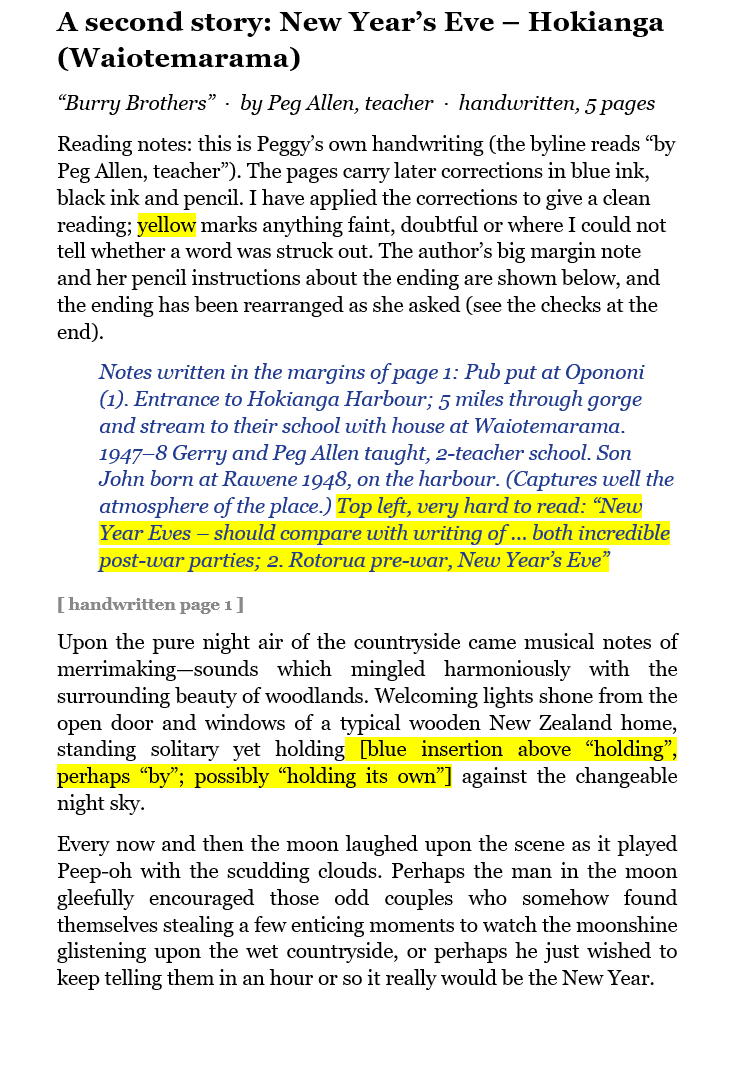
{{HW: ...}}becomes blue italics, so readers can see where Peggy wrote by hand over her own typing. - Photographs. Cropped from the scans, sized to the text block, with the caption directly beneath.
- Front and back matter. Title page, copyright and ISBN page, contents, and a note on the text explaining what was corrected and what was left alone.
- Export. A PDF, checked page by page against KDP’s previewer before upload.
Step 5. The checklist of items that need clarification
This is the most useful thing the process produces, and it is produced as it goes, not at the end. Whenever the source is ambiguous, contradicts itself or contradicts another book, it goes on a numbered checklist with the page, the question and the options. The author’s family answers; the transcript is updated; the item is ticked off.
Real examples from this series:
- One source calls Peggy the daughter of Henry Pullar Ford and another calls her the granddaughter. The drafts follow the Ford booklet until someone confirms.
- Her biography gives her birth year as both 1916 and 1917. The scrapbook says 10 July 1917, and the family has confirmed 1917.
- Pem Lewin was born in 1891, yet the family is described as emigrating to Cape Town about 1886 with nine children all born in England. One of those cannot be right.
- A school in London is spelled “Battersby Park Road” in one place. It may be Battersea.
- A grandfather is “Arthur” in some pages and “Arther” in others.
- Grandchildren: three in one biography, nine in another. Left out until settled.
The list also covers photographs with no caption, names that appear in three spellings, living people whose details should probably not be printed, and newspaper clippings whose permission to reprint needs a thought.
Step 6. Reading Peggy’s handwriting and her comments
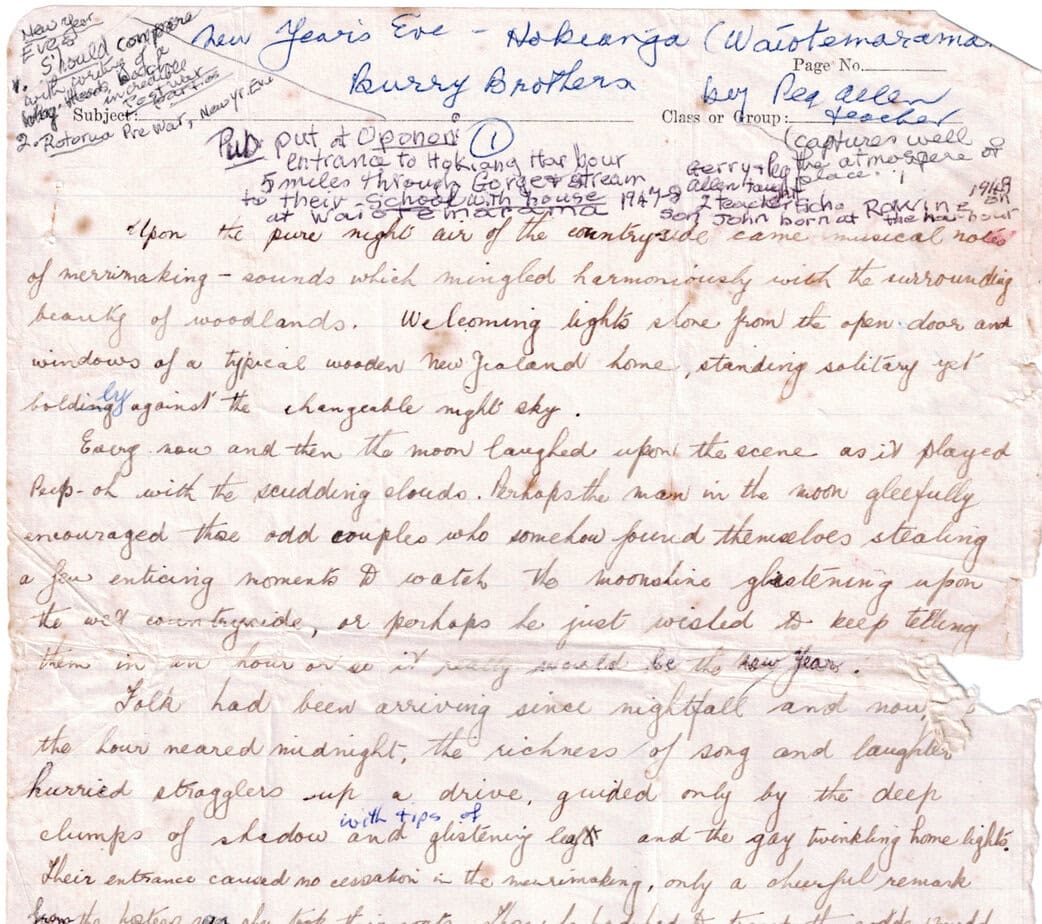
Peggy’s pages are full of small human interventions: a page number in the corner, an arrow and “Cont.” at the bottom of a page, a name added in ink to a typed list of grandchildren, a figure corrected, a sketch of a sledge hammer in a margin, “wider here” above a note. Her cousins’ letters carry their own signatures and afterthoughts.
Claude reads these as a separate layer. Each one is transcribed in place, in blue italics, and classified: a correction to the typed text, an addition, an instruction to a typist, or an aside. Corrections are applied only where the handwriting clearly overrides the type; otherwise they go on the checklist. Illegible words are marked, not guessed.
The same applies to comments from reviewers. Google Docs comments can be read alongside the text. Each one becomes either an edit or a checklist item, so nothing said in a margin is lost between versions.
Step 7. Working the document up to a draft
There are two routes to a first draft, and which one you take depends on the source.
Route A: near-final. If the original is a clean typescript with photographs placed on the page, Claude builds a complete manuscript, you read it, and it goes to proof.
Route B: arrange it yourself. If the original is a jumble, like a scrapbook with photographs and handwritten notes pasted in no particular order, Claude delivers the transcript, the cropped photographs, a suggested sequence and the checklist. You arrange the final layout in Word.
Either way the manuscript goes through numbered versions. The Rotorua People master reached version 6, labelled “post KDP changes”.
Step 8. Proofs and the tracker
Order a printed proof from KDP. A screen is not a page. Mark the proof by hand, send changes back, order again. I kept one tracker for the whole series, with a row per book and columns for ASIN, ISBN, page count, copy status, cover status, version, live date, price, and a To Do column. By the end it was the thing that told me what was done and what was waiting on a proof.
Step 9. The back cover and author blurb
A back cover has about 150 words to do three jobs: stop a browser, say what the book is, and tell them who wrote it. The formula that worked for this series:
- A first line that is a story, not a label. “They cleared the bush by hand, and they stayed.” “He came to be a solicitor. He stayed to clear the bush.”
- One real scene or fact from the book. An Anzac Day in 1990, a ship in 1862, a goat that needs milking.
- Who it is for. Descendants, locals, people who love a place.
- A short author line, the same on every book, so the series reads as one.
Everything is built from the author’s own text. Claude drafts; the family checks every date and every claim, because a back cover is the one place errors are printed in large type.
Step 10. The Kindle publisher and author text
Each KDP listing needs a title and subtitle, a description, an author name, series details, seven keywords, categories, a price and an ISBN. A few practical points:
- The description box allows about 4,000 characters including HTML tags, and accepts only a handful:
b,i,u,br,p,h4toh6,ul,olandli. I had Claude write each description as ready-to-paste HTML, about 2,400 to 2,700 characters, so I could paste each one in and be done. - A bulleted “inside you will find” list converts better than another paragraph.
- The “About the Author” block sits at the bottom of the description.
- Series page. KDP lets you link books into a series; the series page text is written separately and tells the story of the whole collection.
- AI disclosure. KDP asks whether content is AI-generated and has separate rules for AI-assisted work. Read its current guidance before you publish. On the title page of the second edition of Rotorua People I wrote that it was “Scribed with AI”, because I would rather say so than not.
Describing the seven books
This is the series page, written in the same shape as the Kindle series page for the Rotorua Roots Series.
The Rotorua Roots Series. Seven books, four families, one town.
The series gathers the family and community histories of Peggy Allen (née Ford, 1917 to 2014), a Rotorua teacher who spent much of her life writing down the things everyone else assumed would never be forgotten. It is amateur history, and proud of it: amateur comes from the Latin for “lover”, and these books were written for love, from family letters, shipping records, certificates, scrapbooks, newspaper clippings and long conversations in other people’s kitchens.
Book 1. Rural Community 1920s. A community history, 139 pages. On Anzac Day 1990 Peggy stands at a farm gateway above Otonga Road and looks down over Rotorua towards Ngongotaha. The book that follows is her tribute to the Māori and European settlers who cleared bush and scrub by hand, built farms and schools through two world wars, influenza, polio and ragwort, and fought cobalt-starved soil that broke as many settlers as it made. Short enough to read in an evening.
Book 2. Rotorua People 1880s to 1940s. Life south of the old railway, from Glenholme to Whakarewarewa, 287 pages. A street-by-street, family-by-family walk through a Rotorua few people would now recognise, when much of the land was swamp, scrub and mānuka. One story to a page or a pair of pages, newspaper articles reprinted in full, photographs and caricatures throughout. No index, by Peggy’s choice: open it anywhere and a family is waiting.
Book 3. NZ Pioneers: A Ford Family History. First compiled in 1966, reprinted and expanded in 2026, 259 pages. In 1862 Henry Pullar Ford stepped off the Indian Empire onto the Manukau Harbour with a solicitor’s education he would never use, and built a family in the bush at Pollok. The Fords traced from a warden’s cottage near Dunnichen in Scotland to the Waikato, North Dakota and South Africa. The oldest book in the series and the one the others grew from.
Book 4. The Fulljames Family. Bath to Auckland, 184 pages. Alfred Smith Fulljames, born in 1824 at Tottenham, sailed on the Tornado in 1859 and earned his living in the new colony as broker, cabinet-maker, grocer, bookseller and maker of hop beer. His wife Eliza Bell was a Bath miller’s daughter. Through their granddaughter Irene Pearce the line leads to Peggy herself, and to a large clan of cousins.
Book 5. The Allen Family. A Sheriff of Nottingham to a Rotorua schoolhouse, 112 pages. From John Allen (1754 to 1832), Sheriff of Nottingham, through his son James Roger Allen (1795 to 1872) to John George Allen (1830 to 1902), who spent forty years in Picton as Stipendiary Magistrate and was remembered in his obituary as “the embodiment of equity and coldly impartial justice”. Then on through Gerald Ernest Allen (1872 to 1944) to his son Gerry Allen (1916 to 1997), who served in the Pacific, taught in country schools and became founding principal of Otonga Road School.
Book 6. The Lewin Family. Leicester to Cape Town to New Zealand, 113 pages. James William Lewin and Harriet Buckingham, nine children and a move to South Africa, then a second journey to New Zealand. Among those who made it was Pem (Emily), born in Brighton, who became Gerry Allen’s mother. The book grew from a single chart Peggy found in a scrapbook in the 1960s.
Book 7. Watery Moonlight: Yarns from the Long White Cloud. Stories, poems and cartoons of Gerry Allen, 200 pages. Gerry Allen (1916 to 1997) was a qualified accountant who became a teacher, served on a radar unit on Norfolk Island in 1942, ran a two-teacher school in the Hokianga and was the founding principal of Otonga Road School. This is his own writing, typed up from his typescripts: the Waiotemarama story that gives the book its name, in which a new headmaster with no vehicle is rung up on his first evening and asked to milk a goat; Great Barrier Island and its remote coast; a farmer, a frosty morning and a sheep’s head on a gatepost; the pulling down of a hundred-year-old pub; a wartime memoir of life on a radar station; poems; and the verses sung at his farewell from Otonga School in 1975. It is the one book in the series told in Gerry’s own voice rather than Peggy’s.
A sample back cover and author line
Here is the back cover I wrote for Book 7, in the same style as the other six.
A new headmaster, a goat that needed milking, and no idea where Waiotemarama was.
Gerry Allen was an accountant who became a teacher, served on a radar unit on Norfolk Island in 1942, ran a two-teacher school in the Hokianga and, from 1960, founding principal of Otonga Road School in Rotorua. But for a lifetime he watched people, and these are the yarns he told.
Inside you will find a family arriving by truck at a school beside a tumbling stream; the remote coast of Great Barrier Island; a farmer, a frosty morning and a sheep’s head on a gatepost; the pulling down of a hundred-year-old pub; a wartime memoir; poems; and cartoons.
Typed up from his own typescripts, with his wording left as he wrote it. Funny, wry and unmistakably New Zealand.
Book 7 of the Rotorua Roots Series.
And the author line shared across the family books:
Peggy Allen, née Ford (1917 to 2014), was a teacher in Northland and Rotorua, passionate about history and family. She first wrote down her family’s stories in 1966 and spent the following decades researching the Fords, Pearces, Fulljames, Lewins and Allens. In 1990 she turned to the stories of the early settlers of Rotorua. This 2026 edition has been updated by her family, with her own words kept as she wrote them.
What I did not need this time, and what could come next
All seven books went from scan to print using the steps above. A longer project, or a more ambitious book, could draw on a few more specialised skills. None were used here. They are the outline of how to take a draft all the way to complete:
- Indexer. Build a proper name and place index from the transcript. Rotorua People has none, by Peggy’s choice, and a name index would suit a second edition.
- Genealogy consistency checker. Compare every name, date and relationship across all books and the family-tree file, and flag impossibilities such as a mother younger than her child.
- GEDCOM and chart generator. Draw descendant and pedigree charts directly from a GEDCOM export so the trees in the book match the database.
- Photo restoration. Repair, straighten, upscale and colour-correct old prints, with every change logged.
- Caption and credit standardiser. One caption style, one credit style, with every photograph’s source and date recorded.
- Copy editor in the author’s voice. Light-touch correction of typos and punctuation with a visible change list, never rewriting meaning.
- Privacy and permissions review. Flag living people, sensitive details and reprinted newspaper or third-party material.
- KDP preflight validator. Check margins against page count, fonts embedded, image resolution, no stray blank pages, and that the PDF trim matches the cover.
- Cover designer. Calculate spine width from page count and paper, and lay out front, spine and back.
- Ebook conversion. Produce a reflowable EPUB or Kindle file from the same master.
- Metadata and launch planner. Keywords, categories, A+ content, a launch email to the family, and a plan for the first month.
- Accessibility pass. Alt text for photographs and a clean heading structure for the ebook.
Your own box of booklets
If you have a shoebox of old family pages, the work in front of you is smaller than it looks. Scan well, name the files, let the AI do the typing, keep a ruthless checklist and print a proof. The judgement stays with the family, and that is as it should be.
The conversion skill I now use for this is written up as a single file. If you would like a copy to use and adapt, ask. And if you run a business and want to know where AI could save you a similar amount of time, I am happy to meet for a coffee and talk it through. Get in touch through this site.